Research - NodeJS ES6
- Create new application
npm init
- Create new file index.js
console.log('this is command');
=> run:
node index.js
Module in NodeJS:
- VD: tính chu vi và diện tích của hình chữ nhật
- Tạo file retangle.js trong thư mục Shape
// arrow function
exports.area = (width, height) => {
    return width * height;
}
exports.circumference = (width, height) => 2 * (width + height);
Import vào index.js để sử dụng
const rectangleFunction = require('./Shape/Retangle');
let width = 10;
let height = 15;
console.log(Chu vi hinh chu nhat (width: ${width}, height: ${height}) = ${rectangleFunction.circumference(width, height)});
console.log(Dien tich hinh chu nhat (width: ${width}, height: ${height}) = ${rectangleFunction.area(width, height)});
Module Http
- Import
let http = require('http');
- Create simple server
let http = require('http');
const port = 3001;
// Create server
const server = http.createServer((request, response) => {
    response.write('This is response from server');
    response.end();
}).listen(port);
- Server will return text: This is response from server' when navigating to localhost:3001
Nodejs with Babel
- Is a compiler of nodejs, for compiling node js application
Install:
npm install babel-cli --save-dev
Install plugin for babel
npm install --save-dev babel-preset-es2015 babel-preset-stage-2
Add to package.js scripts:
"start": "babel-node http\\index.js --presets es2015,stage-2"
- Install nodemon = Node Monitor
npm install --save-dev nodemon
=> Monit updated file and refresh application
Add to package.json scripts:
"start": "nodemon index.js --exec babel-node --presets es2015,stage-2"
- Create build script with babel
"build": "babel http -d dist --preset es2005,stage-2"
- Description:
- babel: babel command [required]
- http: directory name of source code will be built
- -d: directory
- dist: directory name
Beside, you can create a file to define all settings for babel:
- Create file .babelrc
- Settings:
{ "preset": ["es2015", "stage-2"], "plugin": [] } - Edit scripts: delete all text in scripts: --preset es2015,stage-2
"start": "nodemon index.js --exec babel-node"
Working with file in NodeJS
Require('fs'); //fs = file system
Create new file example: index.js
//import library
const fs = require('fs');
//create new file with name= myFile.txt
exports.createNewFile = (fileName) => {
    const file = fs.openSync(fileName, 'w');
}
- Write file
- Open file
Event trong nodejs
- Require: events
- Import
const EventEmitter = require('events');
ExpressJS
- Install:
npm install -g express-generator
- Create new application:
express --view=ejs myApplicationName
- Use NodeMon for watching changes, edit package.js, set nodemon for script start
start: "nodemon ./bin/www"
- Install all node modules
MongoDB
- Install mongoDB via .msi file
- Create directory: C:/data/db
- Add MongoDB to environment variables (C:\Program Files\MongoDB\Server\3.6\bin)
- Run mongod to run server
Open MongoDB compass to check Is mongo running?
Or run mongo on command line to check it's working
In project, install mongodb, mongoose using npm
Create account:
- Run mongo
- Type use databaseName
- Type: db.createUser({name: 'tamle', pwd: 'tamle', rules: ['readWrite', 'dbAdmin', 'dbOwner']}) to create user login
Connect database in Express application
Connect to application using mongoose
- App.js
var mongoose = require('mongoose');
let options = {
  db: {
    native_parser: true
  },
  server: {
    poolSize: 5
  },
  user: "tamle",
  pass: "tamle"
};
mongoose.Promise = global.Promise;
mongoose.connect('mongodb://localhost:27017/mymongodb', options).then(
  () => {
    console.log('connect db successfully')
  },
  err => {
    console.log('connect db failed: ' + err)
  }
);
Run command mongod first in another command
mymongodb is db name
run npm run start to run application
Create schema for a table in MongoDB
Create file: models/FoodModel.js
Content:
var mongoose = require('mongoose');
var Schema = mongoose.Schema;

var foodSchema = new Schema({
    name: {
        type: String,
        required: true
    },
    foodDescription: {
        type: String,
        default: ""
    },
    createdDate: {
        type: Date,
        default: Date.now
    },
    status: {
        type: [{type: String, enum: ['available', 'unavailable']}],
        default: ['available']
    }
});
foodSchema.path('name').set((inputString) => {
    return inputString[0].toUpperCase() + inputString.slice(1);
})
module.exports = mongoose.model('Food', foodSchema);
Example: call API to create new data in MongoDB database:
- Step 1: Create schema for data (view example above)
Step 2: In routes/index.js, create new function:
let Food = require('../models/FoodModel');
router.post('/insert_new_food', (request, response, next) => {
//response.end\('Post insert new food'\)
var newFood = new Food\({
  name: request.body.name,
  foodDescription: request.body.foodDescription
}\);
newFood.save\(\(error\) => {
  if\(error\){
    resonse.json\({
      result: "failed",
      data: {},
      message: `Error: ${error}`
    }\);
  }else{
    resonse.json\({
      result: "ok",
      data: {
        name: request.body.name,
        foodDescription: request.body.foodDescription,

      },
      message: `Insert data successfully`
    });
  }
})
});
Use Postman posting a request to server
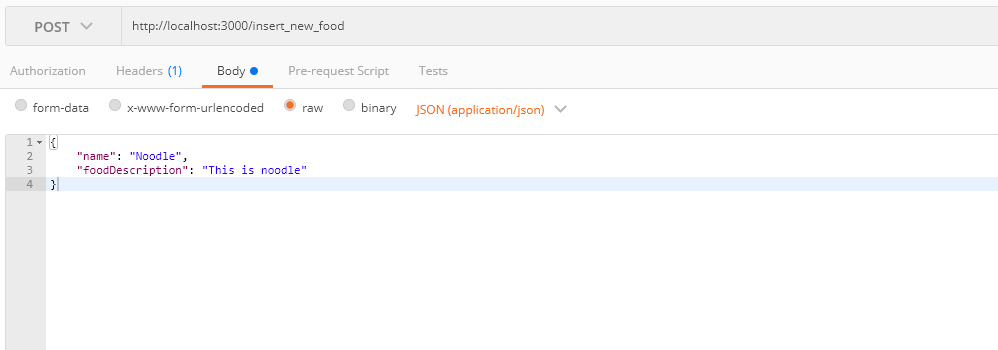
- Check Inserted data:
- Run cmd: mongo
- Use mymongodb
- db.food.find()
- => All data of food table will be shown in cmd
Example: Get all data of a table from database:
In file router/index.js:
`router.get('/list_all_foods', (request, response, next) => {
Food.find({}).limit(100).sort({name: 1}).select({name: 1, foodDescription: 1, created_date: 1, status: 1}).exec((err, foods) => {
    if(err){
      resonse.json({
          result: "failed",
          data: {},
          message: Error: ${error}
        });
    }else{
      response.json({
          result: "ok",
          data: foods,
          message: Command successfully
        });
    }
})
});`
Navigate to localhost:3000/list_all_foods to get all data
Example: Get detail of food based on food id:
Create new router
`router.get('/detail', (request, response, next) => {
  Food.findById(require('mongoose').Types.ObjectId(request.query.id), (err, food) => {
      if (err) {
          resonse.json({
              result: "failed",
              data: {},
              message: Error: ${error}
          });
      } else {
          response.json({
              result: "ok",
              data: food,
              message: Command successfully
          });
      }
  });
});`
Navigate to: http://localhost:3000/detail?id=5aab733e64bdc90a409b4b19
Example for search by name (criteria)
Create new router:
`router.get('/search', (request, response, next) => {
  let criteria = {
      name: new RegExp(request.query.name, "i") //name like '%keyword%'
  }
  Food.find(criteria).limit(100).sort({
      name: 1
  }).select({
      name: 1,
      foodDescription: 1,
      created_date: 1,
      status: 1
  }).exec((err, foods) => {
      if (err) {
          resonse.json({
              result: "failed",
              data: {},
              message: Error: ${error}
          });
      } else {
          response.json({
              result: "ok",
              data: foods,
              message: Command successfully
          });
      }
  })
});`
Navigate to: http://localhost:3000/search?name=noodle
Example for update record
Create new router
`//Update data
router.put('/update_food', (request, response, next) => {//condition let condition = {}; //check data id is valid if(mongoose.Types.ObjectId.isValid(request.body.id) == true){ condition._id = mongoose.Types.ObjectId(request.body.id); }else{ //Alert error: response.json({ result: "failed", data: {}, message: "Please enter food id" }); //return; } //set new data let newValue= {}; newValue.name = request.body.name;` //is return new data? const options = { new: true}; //Update Food.findOneAndUpdate(condition, {$set: newValue}, options, (err, updatedFood) => { console.log(updatedFood); if(err){ response.json({ result: "failed", data: {}, message: `Update failed ${err}` }); }else { response.json({ result: "ok", data: updatedFood, message: "Update food successfully" }); } })});
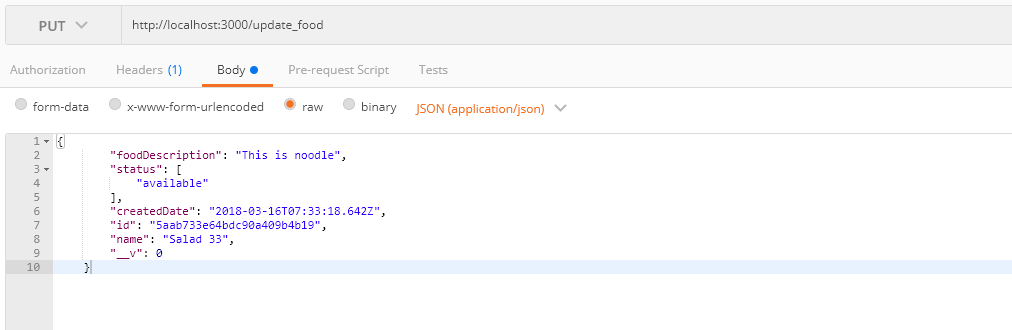
Using postman and put data to update record:
- Link: http://localhost:3000/update_food
- Body:
Upload Image: view detail at: https://www.youtube.com/watch?v=l3oYWIVs5oo
- Use: formidable
Example: Delete food
Creat new router:
`router.delete('/delete', (request, response, next) => {
  Food.findByIdAndRemove({_id: mongoose.Types.ObjectId(request.body.id)}, (err) => {
      if(err){
          response.json({
              result: "failed",
              data: {},
              message: Delete failed ${err}
          });
      }else {
          response.json({
              result: "ok",
              data: {},
              message: "Deleted food successfully"
          });
      }
  });
});`
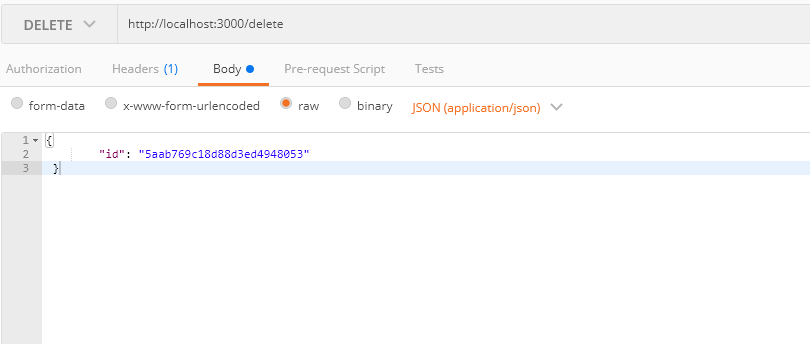
DELETE request
HOW TO USE 'PROMISE' IN NODEJS
- Create new file abc.js
- Install promise:
npm install promise
- Code
var Promise = require('promise');

module.exports = {
    addNewUser: (user, isExist) => {
        return new Promise((fulfil, reject) => {
            if(isExist){
                // raise error
                reject(new Error('this is error message'));
            }else{
                //add user and return added user;
                const newUser = {name: 'tamle', age: 27};
                fulfill(newUser);
            }
        })
    }
};
- Call
myPromise.addNewUser("fssf", true).then((user) => console.log(user)).catch(error => console.log(error));
Validate data using Express-validator
- Install package:
npm install --save express-validator
In App.js
- Import
var expressValidator = require('express-validator');- Define validator option and set express validator for express: (affter express())
const validatorOption = {

};
app.use(expressValidator(validatorOption));
In routers/index.js
`router.get('/test-validator', (request, response, next) => {
  request.checkQuery('page', '"page" must be Integer, not empty').notEmpty().isInt();
  request.checkQuery('limit', '"limit" must be Integer').isInt();
  request.getValidationResult().then((validationResult) => {
      if(!validationResult.isEmpty()){
          //failed
          response.json({
              result: "failed",
              data: validationResult.array(),
              message: Error: Please check error
          });
          return;
      }
      response.json({
          result: "ok",
          data: {},
          message: Look good
      });
  })
});`
=> Check data from url, if data is valid => run and return data, else, return error list
Valid url: http://localhost:3000/test-validator?limit=10&page=1
CUSTOM VALIDATOR
- In App.js update validatorOption
const validatorOption = {
  customValidators: {
    myCustomGreaterThanOrEqual: (inputParam, minValue) => {
      return inputParam >= minValue;
    }
  }
};
- Use:
request.checkQuery('page', '"page" must be Integer, not empty').notEmpty().isInt().myCustomGreaterThanOrEqual(1);
CHUẨN HÓA input value with SANITIZE
- In App.js, update validtorOption
const validatorOption = {
  customValidators: {
    ........
  },
  customSanitizers: {
    convertToUpperCase: (inputString) => {
      let result = inputString.toUpperCase();
      return result;
    }
  }
};
- Use:
request.sanitize('address').convertToUpperCase()
=> If navigating to http://localhost:3000/test-validator?limit=10&page=1&address=tamle, address will be uppercase